
Metadata and artwork
Review the album title, artist, and track names before extracting a CD. This information is used for filenames and tags. You can also select a cover image to embed in FLAC files.
Swipe to see the full image
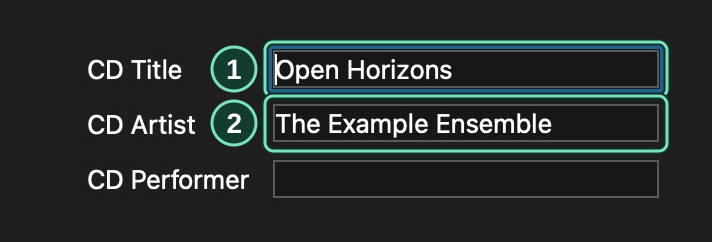
Main window → Album information
- Check the album title before creating filenames.
- Check the album artist used for folders and tags.
Look up an album
Section titled “Look up an album”Enter a contact email or website in OAC → Metadata Options → Metadata Provider, then clear Work offline.
Swipe to see the full image
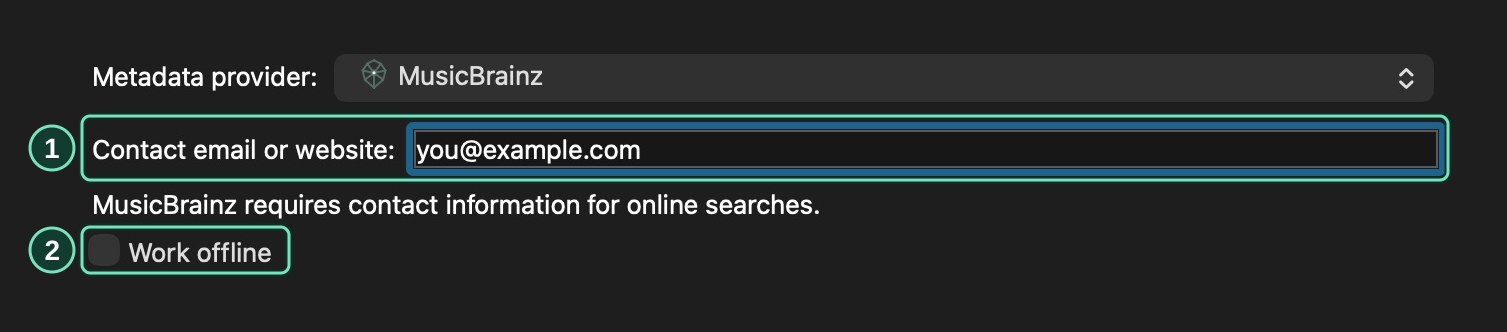
OAC → Metadata Options → Metadata Provider
- Enter your contact email or website.
- Clear Work offline for online lookup.
- Load your CD.
- Use the arrow beside the metadata toolbar button to choose MusicBrainz for an online lookup or Local library for information saved on this computer.
- Click the main part of that button, or choose Database → Get CD Information From → Metadata Provider.
- Select the release whose track list matches your CD.
If MusicBrainz has no matching release, enter the album and track names manually.
Review and apply changes
Section titled “Review and apply changes”Under Changes to apply, select the fields to update. Click Use all proposed values to select every replacement, or choose them individually.
Click Apply to update the disc information and save it in your local library.
Add a cover image
Section titled “Add a cover image”Before applying the selected release:
- Click Find covers and select an image.
- Click Preview selected cover and check that it is the cover you want.
- Check Use this image as the front cover.
- Click Apply.
To include the image in FLAC files, open OAC → Compression Options → Output Presets and enable Embed cover artwork in each preset you will use.
Swipe to see the full image

OAC → Compression Options → Output Presets
- Enable Embed cover artwork in each preset that should include the cover.
Use saved information offline
Section titled “Use saved information offline”Choose Local library to retrieve an album you previously saved. To use saved MusicBrainz responses, enable Work offline in OAC → Metadata Options → Metadata Provider before starting the lookup.
If an album is missing from your saved information, enter its titles manually or connect to the internet and repeat the lookup with Work offline cleared.