
Set up your drive
Insert an audio CD and run setup for each drive you use.
Detect read features
Section titled “Detect read features”- Choose OAC → Load Audio CD, select the drive, and click Drive features.
- Click Detect read features and wait for the results.
- Leave Cache handling, Accurate stream, and Use C2 pointers on Auto to use the detected settings.
- Review any errors or inconclusive results, then click Save.
For a drive you have already loaded, you can also open detection through OAC → Drive Options → Detect Read Features.
Swipe to see the full image

OAC → Drive Options → Extraction Method
- With your drive loaded, open Detect Read Features to run the tests.
If cache detection is Inconclusive, leave Cache handling on Auto and repeat detection with another CD. See Audio caching.
Configure the drive offset
Section titled “Configure the drive offset”A drive may consistently read a little before or after the requested position. Its offset correction compensates for that difference when checking tracks with AccurateRip.
- With the drive loaded, choose Help → Configure AccurateRip.
- Click Look up drive offset.
- Check the drive name and proposed correction, then click Save.
You can also open the offset dialog through OAC → Drive Options → Offset / Speed → Configure drive offset.
Swipe to see the full image
OAC → Drive Options → Offset / Speed
- Open Configure drive offset to look up, measure, or enter a correction for this drive.
If lookup finds no match, calibrate the drive using your CDs.
Select the reading method
Section titled “Select the reading method”Open OAC → Drive Options → Extraction Method and select Secure to compare repeated reads and retry difficult sections. Click OK to save.
Swipe to see the full image
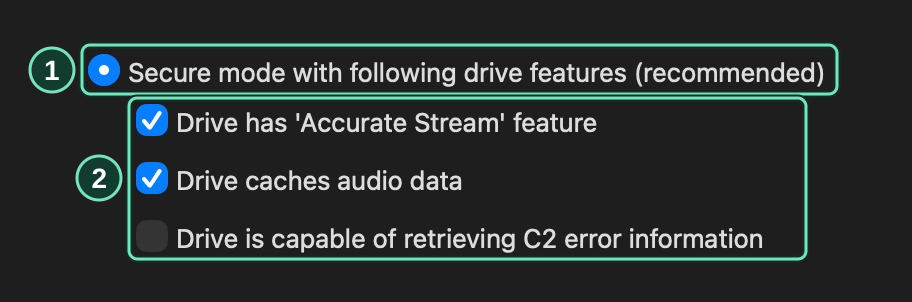
OAC → Drive Options → Extraction Method
- Select Secure for repeated read comparisons.
- Run drive-feature detection to set these options.
Burst copies the audio in one pass. Both methods support AccurateRip. See Secure and burst reading for retry settings.
Continue with Rip your first CD.