
Read the results
Open Status and Error Messages after extraction to see the result for each track.
Check that reading and saving succeeded
Section titled “Check that reading and saving succeeded”Consistent reads means the initial reads agreed. Recovered by rereading means further attempts produced enough matches. Failed tracks include an error message.
Swipe to see the full image
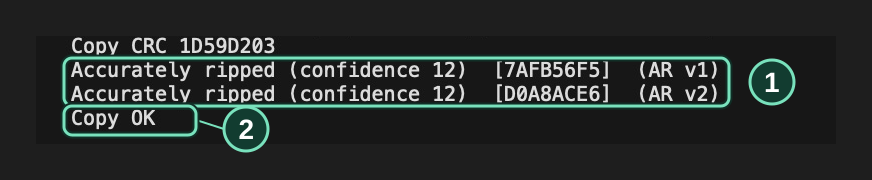
Status and Error Messages → Track result
- This track matched AccurateRip with confidence 12.
- Copy OK confirms that the saved file passed its audio check.
For failed output files, see FLAC encoding failed. For samples replaced with silence, see Disc boundaries and missing samples.
Check the settings used for this copy
Section titled “Check the settings used for this copy”Swipe to see the full image
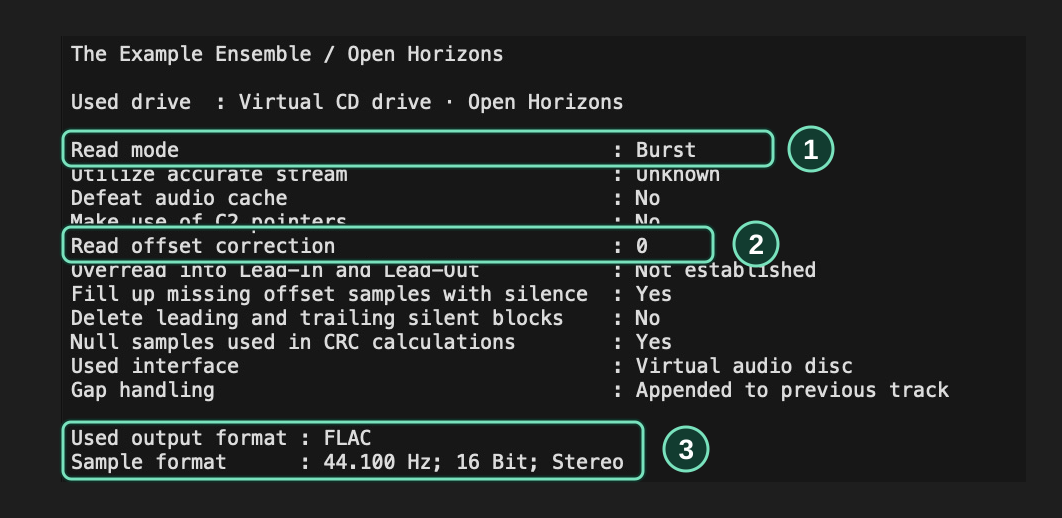
Status and Error Messages → Report header
- Reading method used for this extraction.
- Drive offset correction, in stereo sample frames.
- Output format and audio properties.
Read the AccurateRip result
Section titled “Read the AccurateRip result”AccurateRip compares your track’s checksum with database records for the same CD.
| Result | Meaning | What to do |
|---|---|---|
| Accurately ripped (confidence …) | The track matches a confirmed database record. | Save the log with the audio files. |
| Cannot be verified as accurate | The track checksums differ from the available confirmed records. | Check drive setup and the disc, then try the track again or use another drive. |
| Track not present in AccurateRip database | No record was found for the disc or track. | Use the read and file results to assess this copy. |
| AccurateRip: Unavailable | The lookup or data file could not be read. | Check the reported error, then retry online or load a saved AccurateRip data file. |
| AccurateRip: Incomplete | Audio needed for the check is missing, or a matching record has zero confirmations. | Retry for missing audio. For zero confirmations, check for updated database records. |
| AccurateRip: Not run | AccurateRip verification was disabled. | Enable AccurateRip in the extraction dialog to check the next copy. |
Decide whether to retry
Section titled “Decide whether to retry”For a failed read, inspect the disc and copy the affected track again. If it keeps failing, try another drive. See Drive and extraction problems.
For an AccurateRip mismatch, check the drive’s offset correction and test other discs. Different pressings of an album can have different checksums.
For the details behind each check, read How verification works.